Chibi
Big head, small body, thick outline and flat colours. The classic chat sticker look.



 Made from a sample photo
Tools · Animated GIF stickers · GPT Image 2.6
Upload a photo of yourself, your pet or your mascot, or describe a character. The sticker generator draws it once in one of 12 styles, then GPT Image 2.6 animates it into looping GIF stickers, one per expression, on a transparent background with captions in your language.
Animated samples made with this sticker generator. The captions follow the language of this page.
Sticker type: Animated GIF GPT Image 2.6 draws your character once, then animates it into one looping GIF per expression. · Static One image with 4 to 16 still stickers, cut out on a transparent background.
Each GIF from the sticker generator has 8 frames at 512 × 512, loops smoothly and keeps a transparent background. 285 credits for the character still, plus 84 per GIF
Your photo · optional: A clear, front-facing photo of one person, pet or mascot works best.
Describe your character: Required without a photo. With a photo, add details such as an outfit or a prop.
Chibi, Pixel art, Anime, Photo cutout, Dressed-up pet, Clay mascot, Comic pop, 3D vinyl toy, Kawaii doodle, Watercolour, Flat vector, Retro cartoon
GIFs in the pack: 2, 4, 6, 8 · Stickers in the pack: 4, 6, 9, 12, 16 · Animation speed: Slow, Normal, Fast
Model: GPT Image 2.6 · GPT Image 2.6 Sunburst. Quality: Low, Medium, High. Sheet size: 1K, 2K, 4K. Use 2K or 4K for 9 or more stickers so each one stays sharp.
Your photos and stickers stay private to your account. Only upload photos you have the right to use, and ask before you make stickers of someone else.
Twelve looks in one sticker generator, from cute chibi to real photo cutouts. Every style animates, from a photo or from a description.
Big head, small body, thick outline and flat colours. The classic chat sticker look.
Made from a sample photo
Crisp square pixels and a retro game palette, like a character from an old console.
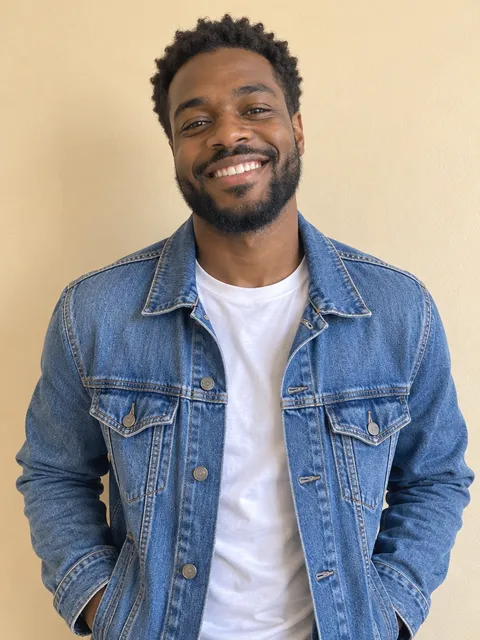 Made from a sample photo
Clean line art, cel shading and big expressive eyes.

Made from a sample photo
Stays a real photo of you, with no beauty filter. Only the expression and the gesture change.


Made from a sample photo
Your pet’s real fur and markings, with tiny outfits and props.
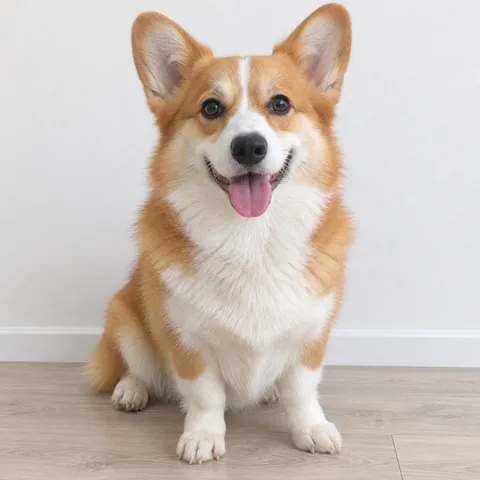 Made from a sample photo
Soft, matte modelling clay with simple dot eyes, like a stop-motion figure.
Made from a description
Bold ink lines, halftone dots and action lines in red, yellow and cyan.
Made from a sample photo
A glossy collectible figure with smooth plastic and soft studio light.
Made from a sample photo
Wobbly pencil and crayon lines in pastel colours, with little sparkles.
Made from a description
Soft washes of colour on textured paper, with gentle ink outlines.
Made from a sample photo
Bold shapes and flat colours with no gradients, like a modern icon set.
Made from a description
Bendy limbs, cream and black with a red accent, like a 1930s cartoon.
Made from a description
GPT Image 2.6 is OpenAI’s newest image model, and the first one that returns animated GIFs. These are the parts of it this sticker generator uses.
| Feature | What it does |
|---|---|
| Animated GIF output | Returns a looping GIF of 2 to 16 frames from one request. Packs in this sticker generator use 8 frames at 512 × 512. |
| Animates from a reference | Starts from your photo or the character still, so the face, outfit and colours stay the same in every frame. |
| Transparent backgrounds | Draws the character still and every GIF frame on a clear background with a white die-cut border. |
| Frame timing | Sets how long each frame shows, from 20 ms to 2 seconds. Here you pick a slow, normal or fast loop. |
| Flare and Sunburst | Two versions at the same price: Flare is the fast default, and Sunburst adds detail and steadier edits. |
| Lettering | Writes short captions into the animation when you choose Drawn by AI captions. |
Speed and quality claims about GPT Image 2.6 come from OpenAI. The sticker generator always uses the model and quality you pick.
A GIF sticker has to move clearly, loop smoothly and look like the rest of the pack. That is where this model helps the sticker generator most.
Each GIF is drawn frame by frame: a wave, a bow or a belly laugh, not a still picture that bounces.
All GIFs start from one character still, so the sticker generator keeps the face, outfit and colours the same across the pack.
The last frame flows back into the first, so every GIF from the sticker generator plays without a jump in a chat.
Every frame keeps a thick white border on a transparent background, so it looks right on light and dark chats.
It changes the style of your photo, not who is in it: hair, glasses, freckles and fur markings stay.
Eight frames at 512 × 512 read clearly at chat size and still fit the size limits of the apps.
Pick an app before you download and the sticker generator saves every sticker in the format and size that app expects, animated or still.
| App | Animated stickers | Static stickers | How to add them |
|---|---|---|---|
| Any app | GIF, 512 × 512, transparent, looping | — | Send or post the GIF anywhere GIFs work, such as Instagram DMs, X, email or a website. |
| Animated WebP, 512 × 512, under 500 KB each, plus a 96 × 96 tray icon | WebP, 512 × 512, under 100 KB each, plus a 96 × 96 tray icon | Import the files with a sticker maker app (3 to 30 per pack), or add them one by one with Stickers › Create in WhatsApp. | |
| Telegram | GIF, 512 × 512 (sent as a GIF) | WebP, 512 × 512 | Send a GIF in any chat. To build a sticker set, send static files to the @Stickers bot. |
| Signal | APNG, 512 × 512, under 300 KB each | WebP, 512 × 512, under 300 KB each | In Signal Desktop, choose File › Create/Upload Sticker Pack, add the files and pick an emoji for each. |
| iMessage | GIF, 408 × 408, under 500 KB each | PNG, 408 × 408, under 500 KB each | Send a GIF in Messages, or add the files to a sticker pack app in Xcode to publish a pack. |
| LINE | APNG, 320 × 270, under 300 KB, up to 4 seconds | PNG, 370 × 320, plus main and tab images | Submit the set to LINE Creators Market for review. LINE sells sets of 8, 16, 24, 32 or 40. |
| Discord | GIF, 320 × 320, under 512 KB each | PNG, 320 × 320, under 512 KB each | In Server Settings › Stickers, upload each file and pick a related emoji. Every server has 5 free slots. |
| Slack | GIF, 128 × 128, under 128 KB each | PNG, 128 × 128, under 128 KB each | In Slack on a computer, open Customise workspace › Emoji and add each file as a custom emoji. |
| GIF, 240 × 240, plus a cover and a 50 × 50 icon | PNG, 240 × 240, plus a cover and a 50 × 50 icon | Add a sticker in any chat from the sticker panel (♥ › +), or submit an album of 8 to 24 to the WeChat Sticker Platform. | |
| — | The full sheet plus every sticker as a 1024 × 1024 PNG | Order from a sticker print shop, or print on sticker paper and cut along the white border. |
Upload a clear photo of yourself, your pet or your mascot, or type a short description.
Choose one of 12 styles, 2 to 8 expressions with captions, and a slow, normal or fast loop.
Check the credit price and generate. GPT Image 2.6 draws your character once, then the sticker generator has it animate each expression.
Fix any caption, choose your app and download a ZIP of animated stickers in the right format.
Each GIF gets one expression, a motion that loops and a caption. The sticker generator suggests these captions in your language; change any of them before or after you generate.
Hi!
OK!
Thanks!
LOL
Love it!
Wow!
Hmm…
Sorry!
Good night
Yay!
So sad
Grr!
Busy
On my way!
Bye!
Cool
Face the camera in good light, with one person or animal and nothing covering the face.
Waves, bows, laughs and jumps animate best in the sticker generator. Tiny changes, like a raised eyebrow, can be hard to see.
One to three words read best at sticker size. Exact text works in any language.
Fast suits jumps and laughs; slow suits yawns, bows and sad moments.
Test a style with Flare, then make the final pack with Sunburst for more detail.
Only use photos you have the right to use, and ask friends before you turn them into stickers.
You add a photo or a description and pick a style and expressions. GPT Image 2.6 first draws one character still, then animates it into a looping GIF for each expression, on a transparent background. LookRoll adds your captions and packs the files for your app.
Yes. Upload one clear photo and the sticker generator keeps your face, hair and outfit, or your pet’s fur and markings, while it changes the style and animates the expression.
Yes. The sticker generator suggests captions in the language of the page, and you can type any words. With Exact text, LookRoll adds the letters itself, so they are always spelled the way you typed them, in all 28 languages.
With Exact text, yes, as often as you like and for free. Drawn by AI captions are part of the animation and need a new generation to change.
Yes. GPT Image 2.6 draws every frame on a transparent background with a white die-cut border, and the downloads keep the transparency.
Animated: WhatsApp (animated WebP), Signal and LINE (APNG), and Discord, Slack, WeChat and iMessage (GIF). Telegram sends them as GIFs in chats. Static stickers work in all of these and in print.
The price is shown in credits before you generate: one character still plus one price per GIF, depending on the model and quality. If a GIF fails, its credits come back automatically.
Every GIF from the sticker generator has eight frames at 512 × 512 and loops. At normal speed each frame shows for 130 ms, so one loop lasts about a second.
Yes. Choose Static in the sticker generator to get 4 to 16 still stickers on one sheet for the price of one image, including a printable sheet.
Yes. Your photos and stickers stay in your private account history. They are processed by our image and safety providers only to make the stickers you asked for.
Open the GPT Image 2.6 studio for posters, product shots, animated GIFs and SVG vectors.
Open GPT Image 2.6 studio All toolsUpdated: