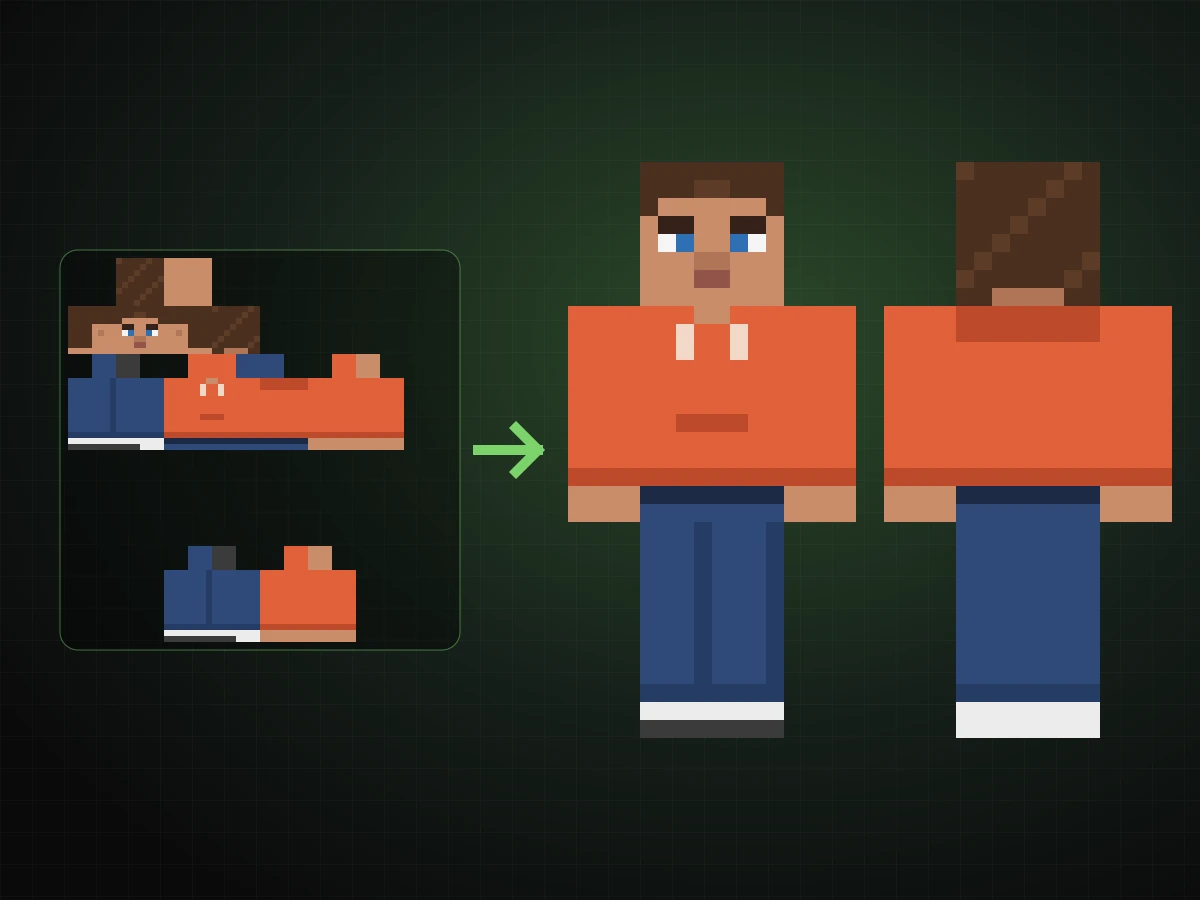
A skin is a 64x64 texture
Every Minecraft skin is a small PNG that wraps around the player model: head, body, two arms and two legs, each unfolded into a flat atlas.
Photo to skin · 64x64 PNG
Upload one picture, get a game-ready skin, then fix any pixel before you join a world.
LookRoll is a Minecraft skin maker for the moment you think “that should be me.” The Minecraft skin editor import photo flow turns a selfie or outfit shot into a 64x64 skin PNG on the standard layout. Check it on a 3D character, repaint details by hand and download it for Java or Bedrock.
One person with a clear face. Waist-up or full-body shows more of the outfit.
GPT Image 2.5 paints your skin on the standard atlas. LookRoll then snaps it to exact 64x64 pixels with a solid base layer.
Use a photo of yourself or of someone who agreed. One person per photo.
Import a photoEach result from the Minecraft skin editor import photo step opens here automatically. You can also import a skin PNG you already have. Editing runs in your browser and never uses credits.

Every Minecraft skin is a small PNG that wraps around the player model: head, body, two arms and two legs, each unfolded into a flat atlas.
Java Edition 1.8 introduced separate left limbs and a second overlay layer for hats, jackets, sleeves and trouser cuffs. Older 64x32 skins mirror one arm and one leg.
A skin maker produces that atlas for you, and a skin editor lets you change single pixels. A Minecraft skin editor import photo option creates the first draft from a picture instead of a blank grid.
The classic model has 4-pixel arms. The slim model has 3-pixel arms. The image size stays 64x64; only the arm columns change.
Upload a JPG, PNG or WebP up to 10 MB, or reuse a file from your upload history.
Pick classic or slim arms. GPT Image 2.5 is the default model; GPT Image 2 and both Nano Banana models are available too.
AI paints your hair, face and outfit onto the standard atlas. LookRoll snaps it to an exact 64x64 PNG with a clean, opaque base layer.
Fix pixels with the pencil, fill and color picker, rotate the 3D preview, then download the PNG.
The standard modern layout with left and right limbs, ready for the Minecraft Launcher and the Bedrock Dressing Room.
Rotate the character to check the front, back and sides before you upload it anywhere.
Pencil, eraser, fill, color picker, undo and redo, plus an overlay layer for hats, hoods and jackets.
Already have a skin? Import a 64x64 or legacy 64x32 PNG and keep editing without credits.
Painting 4,096 pixels from a blank grid takes hours. Starting from your own photo gives you colors and proportions that already resemble you, so every Minecraft skin editor import photo result only needs a few touch-ups.
A whole face has to fit in an 8x8 square, so the skin keeps the traits people recognize and simplifies the rest.
Skin tone, eye color, eyebrows and mouth.
Color and length across the top, sides and back of the head.
Top, sleeves, trousers or skirt and shoes, continued around the body.
Glasses and bold patterns survive best. Small logos and fine prints are simplified.
A sharp, evenly lit photo gives truer skin tone and hair color.
Waist-up or full-body photos give the body, arms and legs real colors to work with.
Solid clothing reads better than thin stripes at 64x64.
Lighting and angle change the result. If a detail is off, fix it in the editor or generate again.
Open the Minecraft Launcher, choose Java Edition and open Skins. Select New skin, choose Classic or Slim, browse to your PNG and save it. You can also upload it from your profile on minecraft.net.
On Windows, Android or iOS, open the Dressing Room, choose Classic Skins, open Owned, then select Import and Choose New Skin. Console editions do not import custom PNG files.
Pick the same Classic or Slim option you used here, or the arms will show a gap or a stretched column.
Photo to skin generation uses credits; editing and PNG import are free. Choose subscription credits or a one-time pack.
Plans & credits| Model | Output | credits |
|---|---|---|
| GPT Image 2.5 | 64x64 PNG | 26 credits |
| GPT Image 2 | 64x64 PNG | 26 credits |
| Nano Banana 2 | 64x64 PNG | 36 credits |
| Nano Banana Pro | 64x64 PNG | 60 credits |
A face in 8x8 pixels keeps key traits, not a portrait. Results vary with lighting, pose and photo quality.
The overlay layer starts empty, so nothing covers your base layer by accident. Add hats or jackets in the editor.
Use photos you have the right to use. Do not upload other people without their permission.
NOT AN OFFICIAL MINECRAFT PRODUCT. NOT APPROVED BY OR ASSOCIATED WITH MOJANG OR MICROSOFT.
Your photo is used only to create your skin. Uploads are safety-checked, creations stay private in your library until you share them, and the editor works locally in your browser.
Upload a clear photo, choose classic or slim arms and select Make my skin. The finished 64x64 PNG opens in the editor, where you can adjust it and download it.
Importing and editing skin PNGs is free. Turning a photo into a new skin uses credits, and the exact amount is shown on the button before you start.
Yes. The download is a standard 64x64 PNG, which the Minecraft Launcher and the Bedrock Dressing Room both accept.
Choose the build you like. Classic arms are 4 pixels wide and slim arms are 3 pixels wide. Select the same option in Minecraft when you upload.
A face has only 64 pixels, so the skin keeps hair, skin tone, glasses and outfit colors and simplifies the rest. Fix any detail with the pencil.
Yes, if you have the right to use the image. Original characters work best; logos and fine text are simplified.
Yes. Select Import skin PNG to open a 64x64 or legacy 64x32 skin in the editor. It stays in your browser.
Confirmed model failures return your credits automatically. Your photo stays selected so you can try again.
Import one photo, fix a few pixels and wear the result in your next world.
Make my skin